


1.The easiest and most effective means to truly disable autorun can be done via this simple autorun registry hack:
REGEDIT4
[HKEY_LOCAL_MACHINE\SOFTWARE\Microsoft\Windows NT\CurrentVersion\IniFileMapping\Autorun.inf]
@="@SYS:DoesNotExist"
2.To use this method, Open Notepad and copy/paste the following into a text file:
REGEDIT4
[HKEY_LOCAL_MACHINE\SOFTWARE\Microsoft\Windows NT\CurrentVersion\IniFileMapping\Autorun.inf]
@="@SYS:DoesNotExist"
save the file as something.reg. (You have to be sure to change the "Save File as Type" to "All Files" before saving, or Windows will try to save it as a .txt even if you typed in .reg.
3.Locate the file you just saved and double-click the file to run it. You will receive a prompt asking if you want to add the data to the registry. Click yes to allow the modification.
4.The above method nulls any request for autorun.inf and works on XP Home or Pro, as well as Windows Vista. Credit for this tip goes to Nick Brown.
If you opt to disable autorun using any other method, you will first need to install an autorun patch from Microsoft that allegedly resolves issues that cause autorun to run even after it's been disabled (using methods other than the above recommended method).
5.XP Pro users who have installed the appropriate Microsoft patch for your system and wish to disable autorun using a method other than described above, follow steps 3 through 8 only. XP Home users begin at step 9. Vista users, see How to Disable Autorun in Windows Vista.
6.Windows XP Pro users: Click Start and then click Run. Type gpedit.msc and click OK. The Group Policy window will open. In the left pane, double-click Administrative Templates
7.In the right pane, double-click System, scroll down the list and double-click Turn Off Autoplay
8.In the Turn Off Autoplay Properties window, select Enabled. From the dropdown next to Turn Off Autoplay on, select All drives and then click OK. Exit Group Policy by selecting File, then choosing Exit from the menu.
9.XP Home users will need to make the changes by editing the registry directly. To begin, click Start and then click Run
10.Type regedit and click OK. The Registry Editor window will open.
11.In the left pane, navigate to:
HKEY_CURRENT_USER
Software
Microsoft
Windows
CurrentVersion
Policies
Explorer.
(Note: For help navigating the registry, see the Windows Basics System Registry tutorial).
12.With Explorer highlighted, in the right-pane right click the value NoDriveTypeAutoRun and select Modify from the drop down menu. The base value will be set to Hexadecimal. If not, select Hexadecimal.
13.Type 95 and click OK.
Note that this will stop Autorun on removable/USB drives, but still allow it on CD ROM drives. If you want to disable autorun on both, substitute b5 for the 95. (Thanks to Ian L. of Manitoba for the tip).
14.Exit Registry Editor by selecting File, then choosing Exit from the menu.
15.You will now need to reboot your computer for the changes to take effect.
How To Disable Autorun


Gateway of India, Mumbai
The Gateway of India was built to commemorate the visit of the King George V and Queen Mary to Mumbai in 1911 AD. The foundation stone was laid on 31st March 1911 AD. The splendid gateway was designed by George Wittet and his design was sanctioned in August 1911 AD. It is built in the Indo-saracenic style integrating local style of architecture also and adoptingfrom the Muslims of Gujarat. Between 1915 AD and 1919 AD, the work proceeded on reclamations at Apollo Pier for the land on which the gateway and the new sea wall would be built. The foundations were completed in 1920.
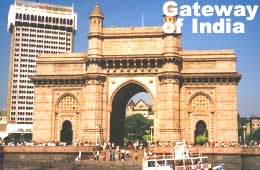
The gateway was built of yellow kharodi basalt and reiforced concrete. The cost of the construction of the gateway came to about Rupes 21,0000, which was given mainly by the government. The approach road was never built due to scarcity of funds and the gateway now stands at an angle to the road leading up to it. The whole seaport front was realigned so that it comes in line with designed promenade, which would sweep down to the middle of the town. The height of the central dome is 48 ft in diameter and rises 83 ft above the ground at its highest point. The has four turets and decorated with intricate lattice work carved into the yellow basalt stone.
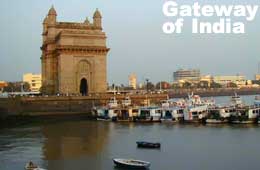
In the past Gateway of India used to be the arrival point for visitors from the west. Ironically, when the Raj ended in 1947, this colonial symbol also became a sort of epitaph: the last of the British ships that set sail for England left from the Gateway. Today this symbol of colonialism has got Indianised, drawing droves of local tourists and citizens. This landmark of Mumbai is a must visit of the city.
The Gateway faces the vast Arabian Sea, flanked by Mumbai's another attraction, Marine Drive, a road running parallel to the sea. The majestic monument is a must-visit at night, in its pristine glory against the backdrop of the sea. It is visited by millions of people across the world every year and is a very significant figure in the lives of the people of Mumbai, as the Gateway defines the grandeur of the city that is a culmination of both, historic and modern cultural environment.The Gateway of India ranks among the most popular tourist attractions in Mumbai. It is located on the banks of the Arabian Sea is the southern waterfront of the city. The gateway is made of basalt and is 26 meters high. Due to its gigantic height, travelers can see the monument from a distance. The harbor is also close by.
The Gateway of India in Mumbai was made to celebrate the visit of King George V and Queen Mary to Bombay, the former name of Mumbai. The monument was designed by an architect named George Wittet and it took around 4 years to complete. The entire monument is made with yellow basalt and concrete and is designed according to the Indo-Saracenic style of architecture. Features of Muslim architectural styles can also be found in the monument. The top of the monument consists of a central dome, which has a diameter of 15 m and is adorned with carvings.
The harbor adjacent had to be completely restructures to allow the construction of the Gateway of India. Made in the early 20th century, it took an enormous amount of 21 lakh rupees to complete the monument. The construction work of the monument was undertaken by Gammon India Limited.

The first major occasion to take place at the Gateway of India was when the First Battalion of the Somerset Light Infantry passed through it. They were the last British troops to leave after India became independent. The ceremony was conducted on 28th February in the year 1948.

Funny Riddles
1.. Only one color, but not one size,
Stuck at the bottom, yet easily flies.
Present in sun, but not in rain,
Doing no harm, and feeling no pain.
What is it.
It's a Shadow
2.
What has holes but holds water?
A sponge
3. Forward I am heavy, but backward I am not.
What am I?
Forward I am ton, backwards I am not.
The Difference Between a Computer Virus, Worm and Trojan Horse
What Is a Virus?
A computer virus attaches itself to a program or file enabling it to spread from one computer to another, leaving infections as it travels. Like a human virus, a computer virus can range in severity: some may cause only mildly annoying effects while others can damage your hardware, software or files.
Almost all viruses are attached to an executable file, which means the virus may exist on your computer but it actually cannot infect your computer unless you run or open the malicious program. It is important to note that a virus cannot be spread without a human action, (such as running an infected program) to keep it going.
People continue the spread of a computer virus, mostly unknowingly, by sharing infecting files or sending e-mails with viruses as attachments in the e-mail.
What Is a Worm?
A worm is similar to a virus by design and is considered to be a sub-class of a virus. Worms spread from computer to computer, but unlike a virus, it has the capability to travel without any human action. A worm takes advantage of file or information transport features on your system, which is what allows it to travel unaided.
The biggest danger with a worm is its capability to replicate itself on your system, so rather than your computer sending out a single worm, it could send out hundreds or thousands of copies of itself, creating a huge devastating effect. One example would be for a worm to send a copy of itself to everyone listed in your e-mail address book. Then, the worm replicates and sends itself out to everyone listed in each of the receiver's address book, and the manifest continues on down the line.
Due to the copying nature of a worm and its capability to travel across networks the end result in most cases is that the worm consumes too much system memory (or network bandwidth), causing Web servers, network servers and individual computers to stop responding. In recent worm attacks such as the much-talked-about Blaster Worm, the worm has been designed to tunnel into your system and allow malicious users to control your computer remotely. Key Terms To Understanding Computer Viruses
virus
A program or piece of code that is loaded onto your computer without your knowledge and runs against your wishes.
Trojan Horse
A destructive program that masquerades as a benign application. Unlike viruses, Trojan horses do not replicate themselves
worm
A program or algorithm that replicates itself over a computer network and usually performs malicious actions
blended threat
Blended threats combine the characteristics of viruses, worms, Trojan Horses, and malicious code with server and Internet vulnerabilities .
antivirus program
A utility that searches a hard disk for viruses and removes any that are found.
Related Webopedia Articles
The Differences and Features of Hardware & Software Firewalls
Understanding Rootkits
Antivirus and Antispyware Software: What's The Difference?
Rogue Anti-Virus Software Explained
What Is a Trojan horse?
A Trojan Horse is full of as much trickery as the mythological Trojan Horse it was named after. The Trojan Horse, at first glance will appear to be useful software but will actually do damage once installed or run on your computer. Those on the receiving end of a Trojan Horse are usually tricked into opening them because they appear to be receiving legitimate software or files from a legitimate source. When a Trojan is activated on your computer, the results can vary. Some Trojans are designed to be more annoying than malicious (like changing your desktop, adding silly active desktop icons) or they can cause serious damage by deleting files and destroying information on your system. Trojans are also known to create a backdoor on your computer that gives malicious users access to your system, possibly allowing confidential or personal information to be compromised. Unlike viruses and worms, Trojans do not reproduce by infecting other files nor do they self-replicate.
What Are Blended Threats?
Added into the mix, we also have what is called a blended threat. A blended threat is a more sophisticated attack that bundles some of the worst aspects of viruses, worms, Trojan horses and malicious code into one single threat. Blended threats can use server and Internet vulnerabilities to initiate, then transmit and also spread an attack. Characteristics of blended threats are that they cause harm to the infected system or network, they propagates using multiple methods, the attack can come from multiple points, and blended threats also exploit vulnerabilities.
To be considered a blended thread, the attack would normally serve to transport multiple attacks in one payload. For example it wouldn't just launch a DoS attack — it would also, for example, install a backdoor and maybe even damage a local system in one shot. Additionally, blended threats are designed to use multiple modes of transport. So, while a worm may travel and spread through e-mail, a single blended threat could use multiple routes including e-mail, IRC and file-sharing sharing networks.
Lastly, rather than a specific attack on predetermined .exe files, a blended thread could do multiple malicious acts, like modify your exe files, HTML files and registry keys at the same time — basically it can cause damage within several areas of your network at one time.
Blended threats are considered to be the worst risk to security since the inception of viruses, as most blended threats also require no human intervention to propagate.
Combating Viruses, Worms and Trojan Horses
The first step in protecting your computer from any malicious there is to ensure that your operating system (OS) is up-to-date. This is essential if you are running a Microsoft Windows OS. Secondly, you need to have anti-virus software installed on your system and ensure you download updates frequently to ensure your software has the latest fixes for new viruses, worms, and Trojan horses. Additionally, you want to make sure your anti-virus program has the capability to scan e-mail and files as they are downloaded from the Internet, and you also need to run full disk scans periodically. This will help prevent malicious programs from even reaching your computer. You should also install a firewall as well.
A firewall is a system that prevents unauthorized use and access to your computer. A firewall can be either hardware or software. Hardware firewalls provide a strong degree of protection from most forms of attack coming from the outside world and can be purchased as a stand-alone product or in broadband routers. Unfortunately, when battling viruses, worms and Trojans, a hardware firewall may be less effective than a software firewall, as it could possibly ignore embedded worms in out going e-mails and see this as regular network traffic.
For individual home users, the most popular firewall choice is a software firewall. A good software firewall will protect your computer from outside attempts to control or gain access your computer, and usually provides additional protection against the most common Trojan programs or e-mail worms. The downside to software firewalls is that they will only protect the computer they are installed on, not a network.
It is important to remember that on its own a firewall is not going to rid you of your computer virus problems, but when used in conjunction with regular operating system updates and a good anti-virus scanning software, it will add some extra security and protection for your computer or network.
The Taj Mahal
The most beautiful building in the world. In 1631 the emperor Shah Jahan built the Taj Mahal in memory of his wife Mumtaz, who died in childbirth. The white marble mausoleum at Agra has become the monument of a man's love for a woman.

 Shah Jahan came to power in 1622 when he seized the throne from his father, while murdering his brothers to ensure his claim to rule. He was known as an extravagant and cruel leader. But he redeemed himself by his generosity to his friends and the poor, by his passion in adorning India with some of its most beautiful architecture, and by his devotion to his wife Mumtaz Mahal - "Ornament of the Palace." He had married her when he was 21, when he already had two children by an earlier consort. Mumtaz gave her husband 14 children in eighteen years, and died at the age of 39 during the birth of the final child. Shah Jahan built the Taj Mahal as a monument to her memory and her fertility, but then relapsed into a life of scandalous behavior. This tomb was only one of hundreds of beautiful buildings that Shah Jahan erected, mostly at Agra and in the new Dehli that came into being under his planning.
 Many architects have rated it as the most perfect of all buildings standing on earth. Three artists designed it: a Persian, an Italian, and a Frenchman. But the design is completely Mohammedan. Even the skilled artisans who built it were brought in from Baghdad, Constantinople, and other centers of the Muslim faith. For 22 years more than 20,000 workmen were forced to build the Taj. The Maharaja of Jaipur sent the marble as a gift to Shah Jahan. The building and its surroundings cost more than $200,000,000 in todays currency.
Passing through a high wall, one comes suddently upon the Taj - raised upon a marble platform, and framed on either side by handsome mosques and stately minarets. In the foreground spacious gardens enclose a pool in whose waters the inverted palace becomes a quivering dream. Every portion of the structure is of white marble, precious metals, or costly stones. The building is a complex figure of twelve sides, four of which are portals. A slender minaret rises at each corner, and the roof is a massive spired dome. The main entrance, once guarded with solid silver gates, is a maze of marble embroidery; inlaid in the wall in jeweled script are qotations from the Koran, one of which invites the "pure in heart" to enter "the gardens of Paradise."

Shah Jahan had begun his reign by killing his brothers; but he had neglected to kill his sons, one of whom was destined to overthrow him. In 1657 his son Aurangzeb led an insurrection from the Deccan. Aurangzeb defeated all the forces sent against him, captured his father, and imprisoned him in the Fort of Agra. For 9 bitter years the deposed emperor lingered there, never visited by his son, attended only by his faithful daughter Jahanara, and spending his days looking from the Jasmine Tower of his prison across the Jumna to where his once-beloved Mumtaz lay in her jeweled tomb.
The new emperor Aurangzeb was a more pious Muslim than his father Shah Jahan had been. He memorized the entire Koran, spent days in fasts, and campaigned against infidelity. He cared little for luxuries, but, paradoxically, gave the world one of its most perfect works of art: a marble screen inside the Taj Mahal. Native and European thieves robbed the tomb of its abundant jewels, and of the gold railing, encrusted with precious stones, that once enclosed the sarcophagi of Shah Jahan and his Queen. Aurangzeb replaced the railing with an octagonal screen of almost transparent marble, carved into a miracle of alabaster lace. Few products of human art have ever surpassed the beauty of this screen.
From afar the Taj Mahal, with its delicate details, is not imposing. Only a nearer view reveals that its perfection has no proportion to its size. When in our hurried times, we see enormous structures of a hundred stories raised in a year, and then consider how 20,000 men worked for 22 years on this little tomb, hardly a hundred feet high, we begin to sense the difference between industry and art. And perhaps more importantly, we sense the ultimate lesson it offers: beauty and that which lasts, is based on love.
Biometrics Security

We have seen in James Bond movies that doors can be opened by giving voice copmmands. In some hollywood movies, you would have seen thumb impressions are used to open doors. All these are nothing but Biometrics.
Think of these scenarios.
You go to a bank to withdraw money. You fill up the withdrawal form, sign it and give it to the bank clerk. Your signature is used to verify your identity
You are shopping using your credit cards. While paying the photograph on the credit cards and the signature on the credit cards are used to verify your identity.
In big companies, all employees are issued an ‘employee pass’ with their photograph. People with these ‘employee pass’es are allowed access to the company premises.
In all these above scenarios, signature and photographs are used to verify a person’s identity. In reality any person can learn to use another person’s signature. Worse still is they can replace your photograph with their own photograph on these cards. Therefore, these existing authentication methods are not secure enough.
Biometrics solves these above issues. Every person’s face is unique. Each person’s thumb impression is also unique. Everyone’s voice is different from others. The eyes are also unique for every person. Therefore it makes sense to use these unique features of each person as a means of authentication.
Therefore for using computers, passwords are no longer required. To enter one’s company , employee passes are no longer required. Your body is sufficient. Using any parts of your body the biometrics system can identify you. America, Canada and some european nations already use these security systems.
What is a Biometrics system?
There are two main modules in a biometrics system. “storing” and “comparing”. The sytems must first store your information before it can use this stored information to compare and verify. The storing process however differs between different systems.
For instance, if the biometrics system uses thumb impression as the mode of verification, then your thumb impression will be first captured in film and stored in the biometrics database system. Instead of storing as it is, the system will compress and store it.
If for instance your face is used as the mode of verification, then your face will be photographed in different angles and stored in the biometrics database systems. The same goes for voice recording and eyes mode of verification.
Once this storing process is done, the ‘comparing’ process is done daily or as and when required. For example let us assume that your company uses finger print biometrics systems. When you come to office daily, there will be a finger print reader at the entrace. You will have to put your finger on this finger print reader which will capture your finger print and send to the biometrics system. The biometrics system will then ‘compare’ this finger print to the finger print that was previously stored in the database. If both of them match then you are authenticated.
Advantages of a biometrics system
The fact that you will have to personally be present in order to authenticate yourself is the advantage of this system. Finger print or retina of the eyes of one person do not match with anyone else’s data in the database. Therefore there is abosolutely no chance of other people using your identity.
Disadvantages of a biometric system.
The finger print of those people working in Chemical industries are often affected. Therefore these companies should not use the finger print mode of authentication.
It is found that with age, the voice of a person differs. Also when the person has flu or throat infection the voice changes or if there there are too much noise in the environment this method maynot authenticate correctly. Therefore this method of verification is not workable all the time
For people affected with diabetes, the eyes get affected resulting in differences.
Biometrics is an expensive security solution.
Free Password Management software

To keep computer files, internet connections and other resources just to ourselves, we use passwords. Some people use the same password for everything. This is a very bad practice. Because if someone comes to know about this password then they will get access to all your resources. There fore it is essential to have different passwords for different purposes. But this poses another problem. It becomes very difficult to remember all these passwords. Some write these passwords in their diary or write on a small paper and keep it on their table. This too is a bad practice. Because it is easy for other people to get hold of this information when you are not around.
If you could keep all your password in a database and then encrypt this database and protect it with a password then all your passwords will be safe. Then you just need to remember this one password, so even if you forget other passwords you can still use this password to open the database and check the password.
You can use a free password management software such as ‘Password Safe‘. You can download password safe from http://sourceforge.net and install it in your computer. Then you will never have to remember many passwords.
To create a master password
When you open Password safe for the first time it will ask you for the ‘Safe combination’ which is nothing but the master password for your password database. The safe combination password should be long and contain both numbers and alphabets so that it is difficult to guess. If you give a simple and easy to guess password then password safe will warn you. Now key in the same password again in the ‘Verify’ box and click on ‘OK’.
To add passwords to Password Safe
Click on the ‘Add Entry’ button in Password Safe. In the new dialog box give ‘group name’ (optional) and the title name and then key in your username and password. In the ‘Notes’ section write anything you want to write about the account. Now click on ‘OK’ to add this information to password safe.
As mentioned in the above paragraph add all your passwords one by one. When you close password safe program it will ask you where you want to save this password database in your hard disk. This is only for the first time.
To retrieve the password
If you forgot the password for any file or program and you want to retrive the password from password safe then password safe will first ask you for the ‘master password’. After you give the master password the database will open.
Then click on the ‘title’ for which you want to know the password. Now click on the ‘Copy password to clipboard’ button. Now the password will be copied to the clip board. You can use Ctrl + V to paste it anywhere you want.
When you exit the password safe program, it will automatically clear the password from the clipboard for security reasons.
You can also edit the password if you want.
passwords
What is ‘Safe Mode’ booting?
While your computing is booting, you can instruct the computer to boot in ’safe mode’. Safe mode refers to secure mode. You may then ask, is our computer not secure when we boot normally. Let us see how is safe mode more secure than the normal booting.
When your computer gives problems and you want to identify where is the problem, then you can use the safe mode for this. In safe mode, only limited number of driver programs are enabled. Therefore you cannot use CD drive. You cannot use the printer. And many other unnecessary drivers are not enabled.
While in Safe Mode, you can use the ScanDisk, defrag and other utility programs to repair your computer. You may wonder how to bring the computer to safe mode. When Windows boots up, you have to press the F8 key. You should press the F8 key before the windows screen appears. Then you can choose the safe mode option to boot.
Some Anti virus software will tell you that some viruses can only beremoved in safe mode, therefore the antivirus software will automatically start in safe mode or you may have to goto safe mode and then run the virus removal utility to remove the virus
FUNNY RIDDLES
1. Which Side of a Cat
Scientists have proven that cats have more hair on one side then their other side. Some people believe that this is because when cats lay on their side they need insulation from the cold on the floor or ground. Which side of a cat has more hair?
» ANSWER
Well Duh! The outside of the Cat of course!
2.How Can This Be?
A woman shoots her husband.
Then she holds him under water for over 5 minutes.
Finally, she hangs him.
But 5 minutes later they both go out together and enjoy a wonderful dinner together.
How can this be?
» ANSWER
The woman was a photographer. She shot a picture of her husband, developed it, and hung it up to dry.
3.There is a common English word that is nine letters long. Each time you remove a letter from it, it still remains an English word - from nine letters right down to a single letter.
What is the original word, and what are the words that it becomes after removing one letter at a time?
ANSWER:
The base word is Startling - starting - staring - string - sting - sing - sin - in -
4.
in roman
After teaching his class all about roman numerals (X = 10, IX=9 and so on) the teacher asked his class to draw a single continuous line and turn IX into 6.
The only stipulation the teacher made was that the pen could not be lifted from the paper until the line was complete.
ANSWER
Draw an S in front of the IX and it spells SIX. No one said the line had to be straight :)
5.I cannot be felt, seen or touched
I cannot be felt, seen or touched;
Yet I can be found in everybody;
My existence is always in debate;
Yet I have my own style of music.
What Am I?
ANSWER
I'm a Soul.